Bottom Line
If a bedroom fan must move air quietly, be controllable from a phone or voice assistant, and offer a range of speeds, the DREO Smart Fan for Bedroom checks every box. Its 85-ft listed airflow reach and 20 dB listed quiet-operation claim make it a strong contender for bedrooms, home offices, and small living spaces. The only caveat is that you should verify compatibility with your existing smart-assistant ecosystem before purchasing.
Quick Decision Table
| Feature | DREO Smart Fan for Bedroom | Best For | Skip If |
|---|---|---|---|
| Airflow reach | 85 ft | Rooms up to 200 sq ft | Larger rooms or open-plan spaces |
| Noise level | 20 dB (listed) | Sleep-friendly environments | Noise-sensitive work areas |
| Speed settings | 9 | Fine-tuned airflow control | Users who prefer a single-speed fan |
| Control options | App, voice, timer | Smart-home integration | Users without smart-assistant devices |
| Price | $58.99 (subject to change) | Budget-conscious buyers | Buyers seeking premium, high-end models |
What Matters for This Purchase
- Air delivery: The 85-ft listed airflow reach indicates how far the fan can push air, which matters in larger rooms. For reference, this range suits spaces up to 200 sq ft, but may fall short for open-concept layouts exceeding 300 sq ft.
- Noise at relevant settings: A 20 dB listed quiet-operation claim suggests the fan will be almost inaudible, ideal for sleeping or studying. However, this figure is manufacturer-reported and lacks third-party verification.
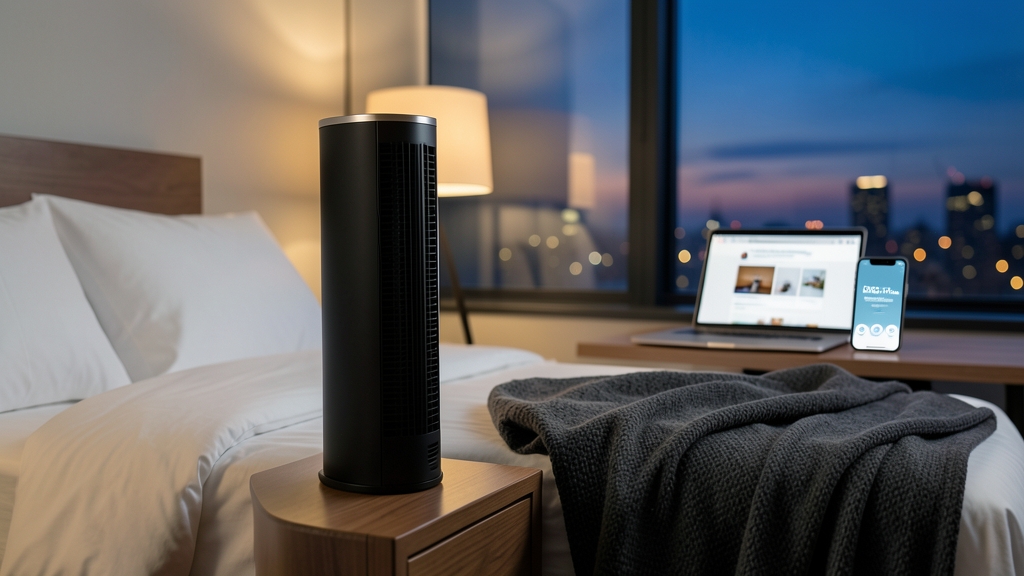
- Footprint and placement: As a tower fan, it occupies minimal desk or bedside space. Its 12-inch width and 19.7-inch height make it suitable for compact areas but less effective in wide-open spaces.
- Controls, modes, and display behavior: Nine speeds, 8- and 12-hour timers, app and voice control provide flexibility. The absence of a physical display means adjustments must be made via app or voice commands.
- Cleaning access: Tower fans typically have removable front panels; no data on this model’s cleaning ports. Users should expect periodic dusting of the grille and motor housing.
- Power and smart-control dependencies: Requires a smart-assistant for app and voice functions; confirm compatibility. The fan lacks a standalone manual mode, relying on Wi-Fi connectivity for full operation.
Product Analysis
DREO Smart Fan for Bedroom
Best for the homeowner who wants a quiet, app-controlled fan that can be positioned on a nightstand or desk without occupying a full-size space. The nine speed settings allow precise airflow adjustment, and the 8- and 12-hour timers enable scheduled operation.
Skip if you need a fan for a large open-plan area, you lack a compatible smart-assistant, or you prefer a straightforward, single-speed fan with no app or voice integration.
Documented evidence: The Amazon listing lists 85 ft airflow reach, a 20 dB quiet-operation claim, 90° + 90° oscillation, nine speed settings, 8- and 12-hour timers, and app/voice control. The product carries a 4.7-star rating from 662 reviews.
Practical consequence: The fan’s quiet operation means it will not disturb sleep or concentration. The app and voice control let you adjust speed or shut it down from bed, which is convenient for nighttime use. The oscillation range covers a wide area, making the fan effective even when placed off-center.
Limitation: The fan’s smart-assistant compatibility is not guaranteed; you should confirm that your Alexa, Google Assistant, or other platform can communicate with the device. Because the fan’s airflow and noise claims are listed but not independently verified, users who need precise CFM data should seek a model with published performance figures.
Who Should Buy and Who Should Skip
- Buyers: Those who value quiet operation, flexible control, and a compact tower design. Ideal for students, remote workers, or anyone who wants to adjust airflow without leaving the bed or desk.
- Skip: If you have a large living area that requires a high-volume fan, or if you do not own a compatible smart-assistant. Also, if you prefer a fan that does not rely on an app or voice commands.
Tradeoffs and Comparison Context
Compared to a standard tower fan that offers only one or two speed settings, the DREO model gives users granular control. The 20 dB listed quiet-operation claim suggests it could be among the quietest tower fans available, though the lack of published CFM data means you cannot confirm how much air it moves compared to a high-volume floor fan.
In the smart-fan segment, the DREO offers a lower price point than premium brands that include advanced sensors or multi-zone control. However, its feature set is limited to basic speed, timer, and voice control; it does not support temperature or humidity monitoring.
Setup, Maintenance, and Ownership
- Unboxing: The fan arrives with a power cord, a quick-start guide, and a removable front panel. Ensure all components are present before proceeding.
- Placement: Position on a stable surface within a 5-ft radius of a power outlet. The tower design allows bedside or desk use, but avoid placing it near curtains or flammable materials.
- Power: Plug into a standard outlet. No separate battery or USB power required. Verify the outlet’s functionality before use.
- Smart-assistant setup: Follow the app instructions to connect the fan to your Wi-Fi network and link it to your Alexa, Google Assistant, or other platform. Verify that the device appears in your smart-assistant app. Note that setup may require a smartphone and stable internet connection.
- Cleaning: Remove the front panel and wipe the grille with a damp cloth. The fan does not have a dedicated dust filter; replace the front panel if dust accumulates. Regular cleaning improves airflow efficiency and reduces motor strain.
- Ownership friction: The fan’s reliance on Wi-Fi and a smart-assistant can introduce setup friction for users unfamiliar with smart devices. If the Wi-Fi connection is unstable, the app and voice controls may fail. Consider having a backup manual method (e.g., physical switch) for critical use cases.
Final Verification Checklist
- Confirm that your smart-assistant is compatible with the DREO fan. Check the manufacturer’s website for supported platforms.
- Verify the fan’s 85-ft listed airflow reach meets your room size. Measure the distance from the fan to the farthest point in your space.
- Check the 20 dB listed quiet-operation claim by comparing it to ambient noise levels in your room. Use a decibel meter or smartphone app for reference.
- Ensure the fan’s oscillation covers the desired area when placed on a bedside or desk. Adjust the oscillation range if necessary.
- Check that the 8- and 12-hour timers function correctly. Set the timer and confirm the fan shuts off as expected.
- Inspect the removable front panel for dust and clean as needed. Use a soft cloth to avoid damaging the grille.
- Make sure the power cord is in good condition and the outlet is safe. Avoid overloading circuits with multiple high-wattage devices.
Exact Product Links
- Internal: DREO Smart Fan for Bedroom
- Amazon: Buy on Amazon
- Official source: DREO official page
As an Amazon Associate, FitzPort Shop earns from qualifying purchases. This does not change the price you pay.
Exact Product Links
Read the DREO Smart Fan for Bedroom product guide.
Affiliate disclosure: As an Amazon Associate, FitzPort Shop earns from qualifying purchases. This does not change the price you pay.
Featured in this Guide

As an Amazon Associate, FitzPort Shop earns from qualifying purchases. Product price and availability are confirmed on Amazon.
Related Resources
Frequently Asked Questions
Common questions about this guide
Choose the DREO Smart Fan for Bedroom if you need flexible, quiet airflow with app and voice control. It offers nine speeds, 85-ft reach, and 20-dB operation, but confirm smart-assistant compatibility first.
This guide takes approximately 6 minutes to read.
The "Featured in this Guide" section identifies the exact product listings used for the product-specific facts in this article. Open the linked product page to review its documented specifications, purchase checks, and retailer link.
Published product pages require an exact retailer identity, current listing data, a usable product image, official source information, documented specifications, and a decision-focused guide. Claims not supported by available sources are presented as buyer checks, not conclusions.
Amazon links are affiliate links. As an Amazon Associate, FitzPort Shop earns from qualifying purchases at no extra cost to you.
Product facts and retailer details are reviewed on a rotating schedule. Always confirm the exact listing, price, availability, seller, configuration, and return terms immediately before purchase.