Bottom Line
If you want a child‑focused device that can flip between a laptop‑style layout with a full letter keyboard and a tablet touchscreen, and you are comfortable supplying three AA batteries, the LeapFrog 2‑in‑1 LeapTop Touch meets those needs. It is best for families seeking built‑in learning modes for letters, numbers, music and messaging without needing a rechargeable battery system. Skip it if you prefer a device with an internal rechargeable battery, a larger high‑resolution display, or more advanced connectivity features that are not listed in the official specifications.
Quick Decision Table
| Documented criterion | Best for | Skip if |
|---|---|---|
| 2‑in‑1 form factor (laptop and tablet) | Ideal for buyers who want both typing practice and touch interaction in one device | Buyers needing a compact, single‑mode tablet should look for a dedicated tablet |
| Five built‑in learning modes | Fits families prioritizing structured educational content out of the box | Buyers wanting extensive third‑party app ecosystems should consider platforms with app stores |
| Powered by 3 AA batteries | Suitable for users who prefer easy battery replacement and no charging cable | Buyers desiring rechargeable battery convenience should seek devices with built‑in charging |
What Matters for This Purchase
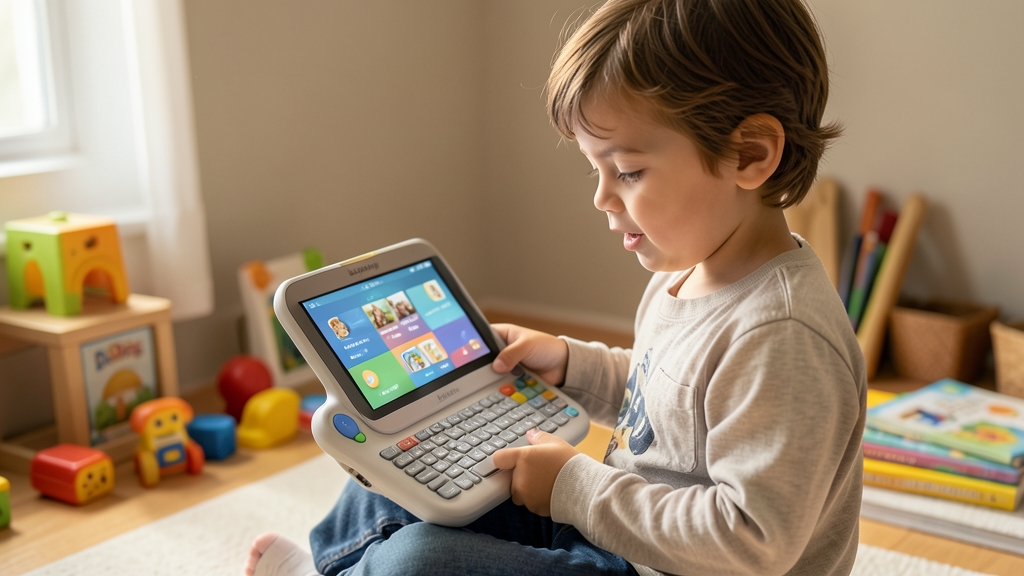
The LeapTop Touch offers a true 2‑in‑1 form factor, allowing the unit to serve as a laptop with a full letter keyboard and number buttons 1‑10, then convert to a touch‑screen tablet. This flexibility benefits buyers who want a single device that supports both typing practice and touch interaction, but it also means the device is larger than a pure tablet and may be less portable for very young children who prefer a smaller handheld.
Educational content is built into the hardware with five distinct learning modes—ABCs, Numbers, Games, Music, and Messages—plus the ability to customize the device with a child’s name. Parents who prioritize structured, screen‑based learning will find value here, while those looking for open‑ended creative apps or third‑party content may need a platform that supports downloadable software, which the LeapTop Touch does not specify.
Product Analysis
LeapFrog 2-in-1 LeapTop Touch
Power is supplied by three AA batteries, a detail that influences ongoing ownership costs and convenience. Families comfortable purchasing and swapping standard batteries will appreciate the ease of replacement, but households that prefer a single‑charge rechargeable system should consider alternatives, as the official source does not mention built‑in charging capability.
The device’s screen is described as larger with animated critter graphics, enhancing visual engagement for early learners. However, without explicit resolution or brightness specifications, buyers seeking a high‑definition display for detailed media consumption should verify those needs against other tablets that list such metrics.
Who Should Buy and Who Should Skip
The LeapFrog 2‑in‑1 LeapTop Touch is suited for families who want a single device that can serve both as a laptop‑style unit with a full letter keyboard and number buttons 1‑10, and as a touchscreen tablet. If your child benefits from practicing typing while also enjoying tap‑based interaction, the built‑in 2‑in‑1 form factor meets that need, and the larger screen with animated critter graphics adds visual interest for early learners.
Parents who value structured educational content will find the five built‑in learning modes—ABCs, Numbers, Games, Music, and Messages—helpful because they are ready to use out of the box. The ability to customize the device with a child’s name further supports a personalized learning experience. This makes the LeapTop Touch a good match for households that prefer ready‑made curriculum over downloading third‑party apps.
Tradeoffs and Comparison Context
Because power is supplied by three AA batteries, the device avoids the need for a charging cable but introduces an ongoing cost of replacing batteries. Buyers who prioritize a rechargeable system with a single charge may prefer alternatives that include built‑in charging, as the official source does not mention any internal rechargeable battery.
The larger screen enhances visual engagement, yet the official source does not provide resolution or brightness details. If high‑definition display quality is a priority for media consumption or detailed educational visuals, you should verify those specifications against other tablets that list explicit screen metrics.
Setup, Maintenance, and Ownership
Ownership involves keeping a supply of standard AA batteries on hand; the device does not include a charging port, so battery replacement is the only power‑related maintenance task. Families comfortable purchasing and swapping AA batteries will find this straightforward, while those who dislike frequent battery purchases may experience inconvenience.
The device’s learning modes are pre‑installed and do not require additional software downloads, which simplifies setup and reduces the need for app management. However, because the official source does not mention an app store or downloadable content, expanding the device’s functionality beyond the provided modes may be limited.
Ongoing Ownership Costs and Warranty
The primary ongoing cost is the purchase of AA batteries, which must be replaced as they deplete; the frequency depends on usage intensity. The official source does not specify a warranty period or terms, so prospective buyers should check the manufacturer’s website or packaging for any warranty information before purchase.
FAQ
What power source does the LeapFrog 2‑in‑1 LeapTop Touch use?
The LeapTop Touch is powered exclusively by three standard AA batteries; the official product page lists “3 AA Batteries” and makes no mention of an internal rechargeable battery or charging port. This means the device must have its batteries replaced when depleted, and users cannot charge it via USB or a dock.
What educational content is built into the device?
The LeapTop Touch includes five pre‑installed learning modes—ABCs, Numbers, Games, Music, and Messages—as stated on the official LeapFrog page. It also offers a full‑letter keyboard with number buttons 1‑10 and allows parents to customize the device with a child’s name. No additional apps or downloadable content are referenced.
Can the device be expanded with third‑party apps or accessories?
The official specifications for the LeapTop Touch do not mention an app store, downloadable software, or external accessory ports beyond the built‑in keyboard and battery compartment. Consequently, the device’s functionality is limited to the five built‑in learning modes, and there is no documented support for installing third‑party applications or expanding capabilities.
Final Verification Checklist
- The exact model is LeapFrog 2‑in‑1 LeapTop Touch as identified on the LeapFrog store page.
- It is sold directly by LeapFrog through its official online store at the provided internal product URL.
- The device’s 2‑in‑1 form factor provides a laptop layout with a full letter keyboard and number buttons 1‑10, and a touchscreen tablet mode, fitting children who need both typing practice and touch interaction.
- Power is supplied by three AA batteries and the unit includes five built‑in learning modes, limiting use to the provided educational content without support for third‑party apps.
- All details are sourced from the official LeapFrog product page, which does not disclose warranty terms or screen resolution.
Exact Product Links
As an Amazon Associate, FitzPort Shop earns from qualifying purchases. This does not change the price you pay.
Featured in this Guide

As an Amazon Associate, FitzPort Shop earns from qualifying purchases. Product price and availability are confirmed on Amazon.
Related Resources
Frequently Asked Questions
Common questions about this guide
Buy LeapFrog 2-in-1 LeapTop Touch for its 2-in-1 laptop and tablet design and learning modes.
This guide takes approximately 5 minutes to read.
The "Featured in this Guide" section identifies the exact product listings used for the product-specific facts in this article. Open the linked product page to review its documented specifications, purchase checks, and retailer link.
Published product pages require an exact retailer identity, current listing data, a usable product image, official source information, documented specifications, and a decision-focused guide. Claims not supported by available sources are presented as buyer checks, not conclusions.
Amazon links are affiliate links. As an Amazon Associate, FitzPort Shop earns from qualifying purchases at no extra cost to you.
Product facts and retailer details are reviewed on a rotating schedule. Always confirm the exact listing, price, availability, seller, configuration, and return terms immediately before purchase.