Bottom Line
If you need a tablet that balances durability, age‑appropriate learning apps, and basic Wi‑Fi connectivity for children aged 3‑8, the LeapFrog LeapPad Academy is a solid choice—provided you are comfortable registering the device and potentially subscribing to LeapFrog Academy after the three‑month free trial. It is less suitable for families that require high‑resolution video, extensive third‑party app ecosystems, or ruggedness beyond the included silicone bumper.
Quick Decision Table
| Documented criterion | Best for | Skip if |
|---|---|---|
| Removable silicone bumper with kickstand and shatter‑resistant screen | Parents who need drop protection and a stable viewing angle for young children | Buyers requiring waterproof or higher impact‑rating protection |
| 20 pre‑installed educational apps plus three‑month free LeapFrog Academy trial | Families wanting a curated, curriculum‑aligned learning library | Users needing unrestricted access to third‑party app stores |
| Expandable storage via micro‑SD slot up to 32 GB (card sold separately) | Kids who may accumulate photos, videos, or additional learning content | Consumers demanding large internal storage without extra purchases |
| 1.5 GHz quad‑core processor and 16 GB internal memory | Children who run the included apps smoothly and need basic multitasking | Power users requiring high‑performance gaming or intensive media editing |
| Two‑year manufacturer warranty | Buyers who value a defined support period for peace of mind | Shoppers looking for longer warranty coverage or on‑site service options |
What Matters for This Purchase
The tablet’s removable silicone bumper with a built‑in kickstand and a shatter‑resistant 7‑inch LCD screen directly address the drop‑and‑fall risks typical of young children. At 2.38 lb and a slim 0.6‑inch depth, it remains portable enough for small hands while offering enough surface area for comfortable interaction. Parents who prioritize physical protection and a stable viewing angle will find these features align with their expectations.
Learning content is anchored by 20 pre‑installed apps covering coding, reading, math, science, spelling, puzzles, and logic, plus a three‑month free trial of LeapFrog Academy that unlocks over 2,000 educational games and activities. The tablet includes Wi‑Fi connectivity for downloading additional LeapFrog content after registration. Families seeking a curated, curriculum‑aligned library will benefit, while those who prefer unrestricted app stores may need a different platform.
Technical specifications include a 1.5 GHz quad‑core processor, 16 GB internal storage, and a micro‑SD slot expandable up to 32 GB (card sold separately). Dual 2 MP cameras enable basic photo and 480p video capture, suitable for simple creative projects. The built‑in rechargeable lithium‑ion battery provides untethered use, and a two‑year manufacturer warranty adds peace of mind. Buyers who need higher‑resolution media, larger storage, or longer battery life should compare alternatives.
Product Analysis
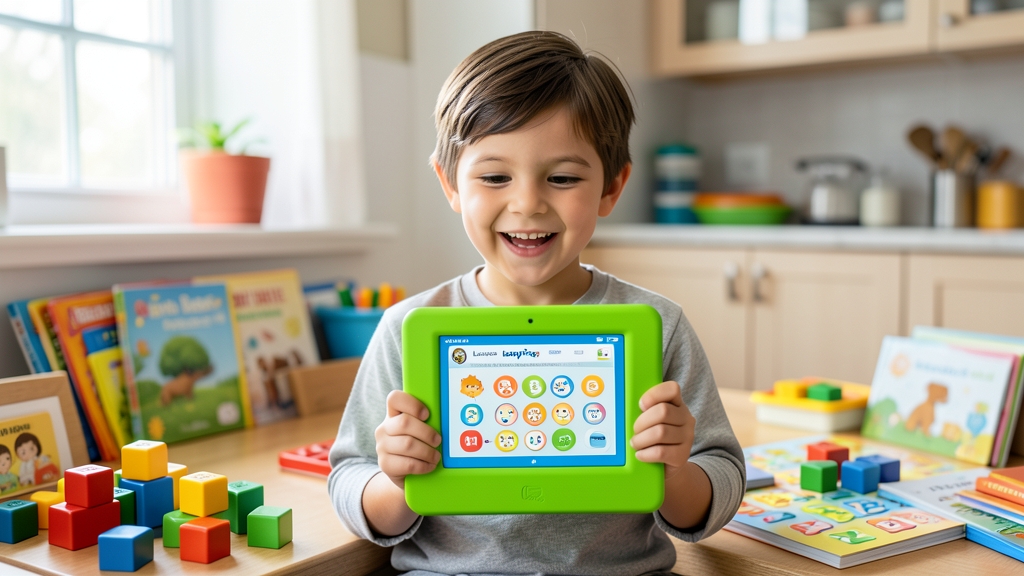
LeapFrog LeapPad Academy Kids’ Learning Tablet, Green
Choosing this tablet makes sense when the primary goal is an all‑in‑one learning device that limits exposure to unsuitable content and offers parental controls through the LeapFrog ecosystem. The included bumper and modest weight reduce the likelihood of damage, and the free Academy trial lets families evaluate the educational value before committing financially. If a child’s interests evolve beyond the provided curriculum, the need to purchase a micro‑SD card and possibly a subscription may affect the overall cost of ownership.
Potential ownership friction includes the requirement to register the device to activate the free trial and to set up a Wi‑Fi connection for future content updates.
Who Should Buy and Who Should Skip
Parents of children ages three to eight who value a device built specifically for learning will find the LeapFrog LeapPad Academy a strong match. The tablet ships with a removable silicone bumper and built‑in kickstand, and its shatter‑resistant 7‑inch LCD reduces the risk of damage from typical drops. At 2.38 lb and a slim 0.6‑inch depth, it is light enough for small hands while still offering a comfortable surface for interaction. If a family’s priority is a curated educational experience with parental controls, this tablet aligns with those needs.
Households that want the ability to expand storage for photos, videos, or additional learning content can do so via the micro‑SD slot, which supports cards up to 32 GB (card sold separately). The included 16 GB of internal memory and 1.5 GHz quad‑core processor provide sufficient performance for the pre‑installed apps and basic multitasking. Families comfortable purchasing an optional micro‑SD card and managing limited internal storage will benefit, whereas those requiring large built‑in storage without extra accessories may need a different solution.
Tradeoffs and Comparison Context
The tablet’s content ecosystem is limited to the pre‑installed apps and LeapFrog Academy offerings, which are accessed after registering the device and connecting to Wi‑Fi.
Screen resolution is limited to 1024 × 600 pixels, and video capture is capped at 480p, which may not satisfy families seeking high‑definition media playback or creation. The battery is a built‑in rechargeable lithium‑ion unit, but the source does not specify runtime, so users cannot gauge how long the tablet will last between charges. If extended media consumption or long unplugged use is a priority, these constraints could be a drawback.
Setup, Maintenance, and Ownership
Initial setup requires connecting the tablet to Wi‑Fi and registering the device to activate the three‑month LeapFrog Academy trial. The registration step is mandatory for accessing the free content library, and families must decide whether to continue with a paid plan afterward. The included USB charger and wall adapter simplify charging, but the battery’s longevity will depend on usage patterns that are not detailed in the source.
Maintenance considerations include keeping the removable silicone bumper attached for drop protection and cleaning the screen with a soft cloth. The stylus and kickstand are part of the package, but the micro‑SD card, if purchased, will need occasional management. Because the device lacks a replaceable battery or user‑serviceable components, any hardware issues will likely be addressed through the manufacturer’s warranty process rather than DIY repairs.
Ongoing Ownership Costs and Warranty
The tablet comes with a two‑year manufacturer warranty that covers defects for that period. Ownership costs include the optional micro‑SD card (up to 32 GB) and any subscription fees for LeapFrog Academy after the three‑month free trial, though the exact subscription price is not provided in the source. No other recurring fees are documented. Prospective buyers should verify the subscription cost and confirm whether a micro‑SD card is needed for their storage expectations before purchase.
FAQ
What age range is the LeapFrog LeapPad Academy designed for?
The LeapFrog LeapPad Academy Kids’ Learning Tablet is officially recommended for children ages three through eight years. This age guidance aligns with the device’s pre‑installed educational apps, the included three‑month LeapFrog Academy trial, and the hardware design such as the 7‑inch shatter‑resistant screen and removable silicone bumper, which are tailored for younger users.
Can the tablet’s storage be expanded beyond the built‑in capacity?
Yes, the tablet includes a micro‑SD card slot that supports cards up to 32 GB, though the card must be purchased separately. This expansion option supplements the 16 GB of internal memory, allowing families to store additional photos, videos, or learning content. The slot’s presence is documented in the official specifications and provides flexibility for future storage needs.
What items are included with the LeapPad Academy and what warranty does it have?
The package contains the tablet, a removable silicone bumper with built‑in kickstand, a stylus, a USB charger, a wall adapter, and a quick‑start guide. Additionally, a three‑month free trial of LeapFrog Academy is provided. The manufacturer offers a two‑year warranty covering defects, as stated in the official product details, giving buyers a defined support period.
Final Verification Checklist
- The exact model is LeapFrog LeapPad Academy Kids’ Learning Tablet, Green.
- The tablet is sold through LeapFrog’s official online store and an Amazon affiliate listing.
- Its dimensions are 8.5 × 5.9 × 0.6 inches and it weighs 2.38 lb, fitting comfortably in small hands.
- It is intended for ages 3‑8, requires Wi‑Fi for additional content, and does not support open third‑party app stores.
- All specifications, warranty information, and included accessories are sourced from the official LeapFrog product page.
Exact Product Links
- LeapFrog LeapPad Academy Kids’ Learning Tablet, Green
- Check the exact Amazon listing
- Official model documentation
As an Amazon Associate, FitzPort Shop earns from qualifying purchases. This does not change the price you pay.
Featured in this Guide

As an Amazon Associate, FitzPort Shop earns from qualifying purchases. Product price and availability are confirmed on Amazon.
Related Resources
Frequently Asked Questions
Common questions about this guide
Buy the LeapFrog LeapPad Academy Kids’ Learning Tablet, Green for a kid-friendly device with a shatter-safe LCD screen and 20 included learning apps.
This guide takes approximately 6 minutes to read.
The "Featured in this Guide" section identifies the exact product listings used for the product-specific facts in this article. Open the linked product page to review its documented specifications, purchase checks, and retailer link.
Published product pages require an exact retailer identity, current listing data, a usable product image, official source information, documented specifications, and a decision-focused guide. Claims not supported by available sources are presented as buyer checks, not conclusions.
Amazon links are affiliate links. As an Amazon Associate, FitzPort Shop earns from qualifying purchases at no extra cost to you.
Product facts and retailer details are reviewed on a rotating schedule. Always confirm the exact listing, price, availability, seller, configuration, and return terms immediately before purchase.