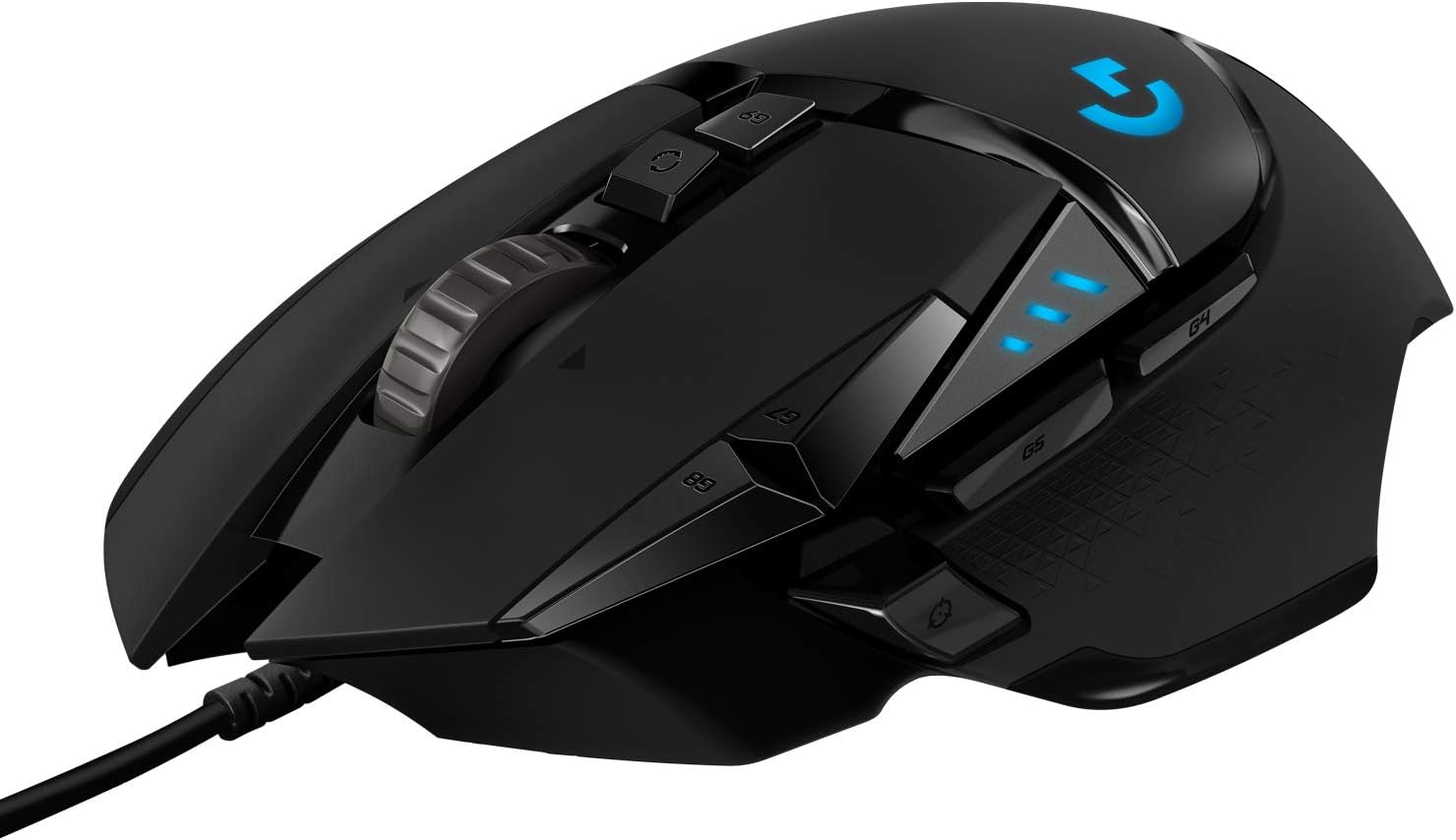
Bottom Line
Choose the Logitech G502 HERO if you want a wired gaming mouse with documented button programming, adjustable weights and onboard settings, and you are willing to configure it around your own controls. Its useful distinction is the combination of eleven programmable buttons and sensitivity controls, not the largest DPI number by itself. The HERO 25K sensor supports a maximum of 25,600 DPI, but that maximum does not establish better results for your games. Decide which commands and sensitivity changes you would actually use before paying for configuration options that may not matter to your routine.
Who It Suits
Buy It If
Shortlist it when you can name specific commands you want on the mouse and intend to use Logitech G HUB to configure them. A useful starting exercise is to list frequently used actions and decide which are convenient to move from the keyboard. Keep essential controls understandable rather than filling every available assignment immediately. The right configuration is the one that matches your tasks, not the one with the most macros.
Skip It If
Choose another model if its documented connection type or control arrangement better matches your requirements. For example, compare explicitly documented wireless models when a cable would conflict with your desk setup. Do not infer that an alternative is lighter, more comfortable or more accurate without comparable evidence. If physical dimensions or a particular grip are decisive, obtain the relevant exact-model specifications and compare them with your own requirements before choosing.
Documented Specifications
| Documented fact |
Why it matters |
| Wired gaming mouse |
Evaluate cable routing as part of the desk arrangement |
| HERO 25K sensor; maximum 25,600 DPI |
Choose sensitivity for your task rather than treating the maximum as a target |
| 11 programmable buttons through G HUB |
Plan specific command assignments before configuring controls |
| Up to five selectable DPI settings |
Decide whether several sensitivity presets would be useful |
| Three DPI indicator lights |
Identify the currently selected sensitivity setting |
| Adjustable weights |
Assess configuration preferences without assuming a particular supplied weight mass |
| Onboard memory for saved settings |
Separate initial configuration from subsequent use of saved settings |
| LIGHTSYNC RGB lighting |
Consider whether lighting customization matters to your purchase |
Decision Analysis
The button count is most useful when it solves a specific control problem. Eleven programmable buttons do not automatically make a game or application easier to use. Compare the commands you need, where you want to reach them and how often you change them. A sensible configuration can begin with a few important assignments, leaving other controls unchanged until you know what you want them to do. That is a configuration strategy, not a measured claim about speed or competitive performance.
Sensitivity controls deserve the same deliberate approach. Logitech documents cycling through as many as five DPI settings, three indicator lights and a DPI Shift button whose sensitivity or function can be configured in G HUB. Think about whether you need distinct settings for separate tasks or prefer one consistent setting. Changing a setting deliberately is different from choosing the largest available value. The maximum sensor specification does not tell you which setting will suit a particular display, task or personal preference.
The manufacturer also documents saved settings in onboard memory. It says saved settings can work on a PC without additional software or a login. That is useful to investigate if you move between computers, but check which of your intended assignments belong in the saved profile. Do not turn a general onboard-memory statement into an unsupported promise about every macro, application integration or operating system. Configuration software support and the behavior of a saved assignment are related but separate questions.
Comparison Context
Compare this model with alternatives using the features that change your decision: connection type, documented control assignments, sensitivity switching and the settings workflow. A buyer who wants a small number of familiar controls may value a different arrangement from someone who has a detailed command plan. Neither preference proves that one product is universally better. Use exact model specifications rather than carrying facts across the G502 HERO, G502 LIGHTSPEED and G502 X names.
Adjustable weights add another configuration choice. The official page used for this guide establishes the feature but does not provide the mass of each weight in the captured evidence. Do not build a weight calculation from an assumed accessory specification. Check the exact package and full technical specifications when that detail matters. A named adjustment system is a reason to investigate a fit with your preferences, not proof of comfort for a particular hand or grip.
Ownership and Setup Checks
Before ordering, confirm the wired HERO model, black configuration and exact seller. Check the current G HUB requirements for the computer on which you intend to configure it, including any restrictions on installing software. On a managed or shared computer, confirm what configuration tools are permitted rather than assuming that a saved profile removes every setup requirement. Review the manufacturer's current support documents for any assignment behavior important to you.
Plan cable placement at the desk and identify the sensitivity settings you intend to use. Configure a small, understandable set of assignments first, then compare the result with your original command plan. Keep a note of the settings you want saved before moving to another computer. No product-specific cleaning method, maintenance interval or replacement-part cost is inferred here; use the manufacturer's exact instructions and applicable support terms for those matters.
Limitations and Checks
This is analysis of documented features, not a measured assessment of click latency, sensor behavior, durability or ergonomics. A sensor name cannot establish every performance characteristic, and the presence of programmable controls cannot establish how naturally their placement suits your hand. Where those factors determine the purchase, seek relevant model-specific measurements or a way to assess physical fit under the seller's applicable terms. Do not substitute generic gaming language for that evidence.
The price shown beside the product is a marketplace observation, separate from the feature analysis. Confirm the current total and seller on the exact linked offer, especially when comparing bundles or similarly named models. Check warranty eligibility for that seller and region. No warranty duration, return entitlement, service price or ongoing ownership-cost advantage is claimed from the product's component list.
Verdict
The G502 HERO is worth shortlisting when its wired connection, eleven programmable buttons and sensitivity controls solve needs you can identify in advance. The stronger buying case is a clear command and configuration plan, not an assumption that a high DPI ceiling improves every game. Confirm the exact model, software requirements, physical specifications and seller terms, then decide whether the documented configuration options justify their place in your setup.
Evidence and Sources
Consult Logitech's G502 HERO product documentation, check the exact Amazon product offer, and read FitzPort's research methodology.
As an Amazon Associate, FitzPort Shop earns from qualifying purchases. This does not change the price you pay.