Bottom Line
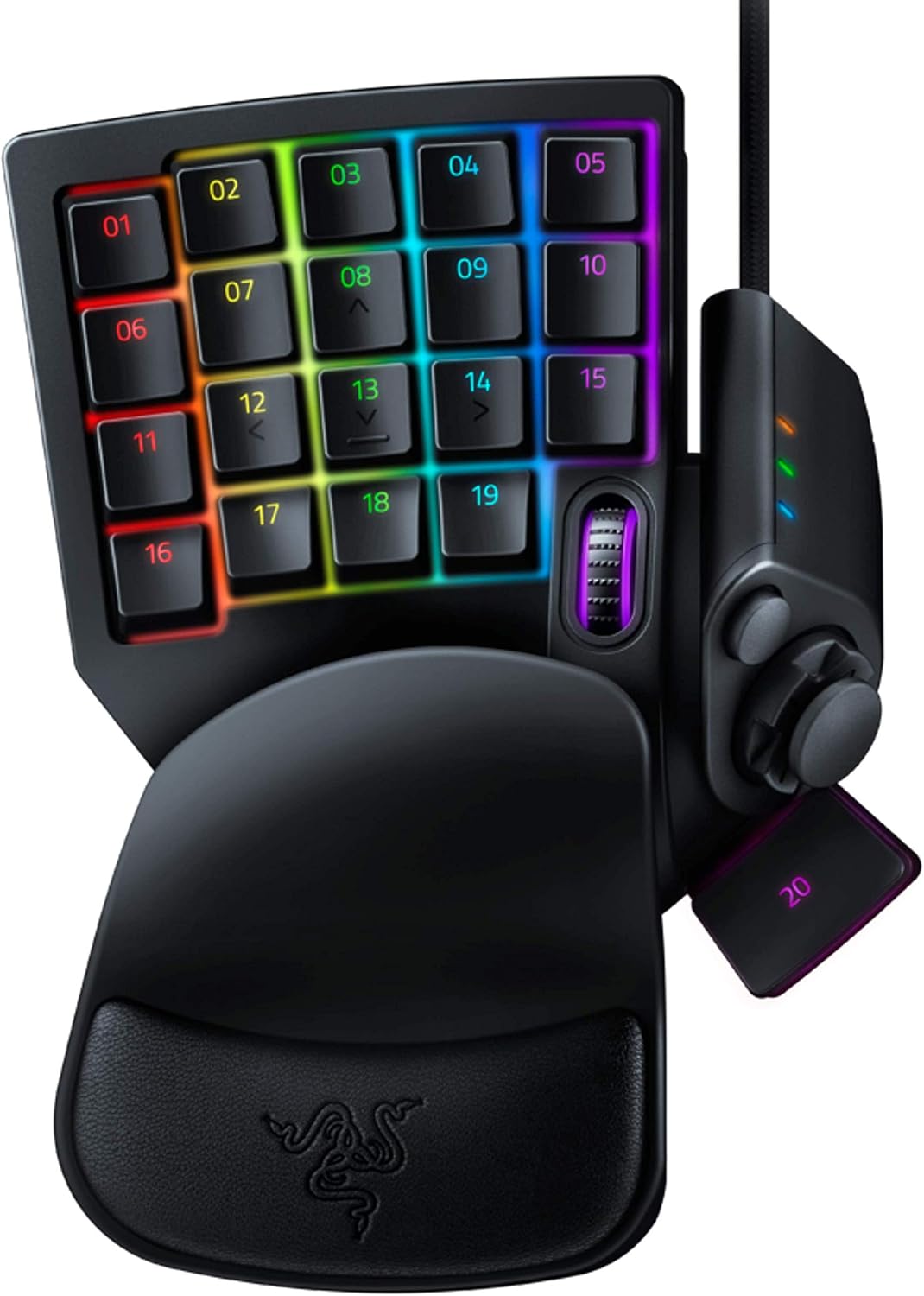
Choose the Razer Tartarus V2 when you have a specific plan for its 32 programmable keys and 8-way directional thumbpad. The purchase makes more sense when you can name the commands you want to move onto the keypad than when you simply want more buttons. Razer documents a key design combining a membrane rubber dome with a tactile mechanical click and actuation at mid-height. Those descriptions establish the manufacturer's design, not measured response times or a guarantee of better results. This is a source-based buying assessment with no original performance testing.
Who It Suits
Shortlist this model if your game uses commands, skills, hotkeys or macros that you want to organize in a dedicated layout. Write down the actions you use frequently and decide which should be adjacent. Then consider how the thumbpad would fit that arrangement. Razer describes it as an option for movement or additional commands; choose the role that matches your intended controls rather than assuming it must replace your existing movement setup.
Compare another arrangement if you cannot identify a useful command map or if changing familiar controls is not a priority. That is a workflow preference, not a claim that the keypad performs poorly. The existing listing's left-handed wording should not be read as a promise of suitability for every left-handed player. Inspect the physical layout against the hand you intend to use and the rest of your desk before buying. No personalized fit or strain-reduction claim is made here.
Documented Specifications
| Manufacturer statement |
Scope |
Buying implication |
| 32 fully programmable keys |
Tartarus V2 |
Plan assignments before counting spare controls |
| Skills, hotkeys and macros |
Documented programming uses |
Identify the actions you want to assign |
| 8-way directional thumbpad |
Tartarus V2 |
Decide between movement and additional commands |
| Membrane rubber dome |
Described key construction |
Compare the documented switch design |
| Tactile mechanical click |
Described key feedback |
Keep feedback preference separate from measured speed |
| Actuation at mid-height |
Manufacturer description |
Do not infer an actuation distance in millimeters |
These statements come from the official Tartarus V2 page. They refer to this exact model, not Tartarus Pro or another generation. The page's language about instantaneous response and faster commands is marketing, not a benchmark reproduced in this assessment. No numerical latency, switch travel or endurance rating is supplied here.
Decision Analysis
The central tradeoff is command flexibility versus the effort of designing a useful layout. Start with a small set of essential actions rather than filling every available assignment immediately. Put the actions you need to distinguish clearly into a written map, and decide what you would leave on your other controls. That exercise tells you whether a programmable keypad answers a real requirement before any claim about speed enters the decision.
Treat the thumbpad as its own decision. An 8-way directional control offers a documented place for movement or expanded commands, but the number of directions does not establish how your chosen game interprets them. Check the input behavior you require and whether the intended assignment is allowed by the game. Do not turn the directional description into an unsupported claim of analog control, adjustable sensitivity or a particular controller-emulation mode.
The key design also deserves a precise comparison. Razer describes membrane cushioning and a tactile mechanical click together; that is more informative than treating every product called a gaming keypad as the same switch category. If key feel is decisive, seek an appropriate opportunity to evaluate it. Manufacturer terminology alone cannot establish what force you will prefer, how the sound fits your room or whether the feedback feels comfortable to you.
Comparison Context
Compare this keypad with a conventional keyboard layout by the commands you actually need to reach. A useful comparison can favor keeping familiar controls if the proposed keypad map adds no benefit to your routine. Conversely, a dedicated command plan may justify shortlisting the Tartarus V2 without claiming that it improves every game or replaces every other input device. Keep the decision tied to the task you are trying to organize.
When comparing another programmable keypad, separate the number of documented controls, directional input and described key technology. Do not import specifications from a similarly named Tartarus variant. A different model's switch type, software feature or connection claim is not evidence for this one. If dimensions, connection requirements or current software support determine the purchase, obtain exact-model documentation answering those questions before ranking the offers.
Ownership and Setup Checks
Confirm Tartarus V2 and ASIN B07754PYFK on the selected offer. Check condition, seller and included components rather than assuming every marketplace package matches a manufacturer photograph. Retain the exact order details if the offer's terms matter to your decision. The source used here is a product overview, not a seller-specific return agreement or an assurance that every listing is authentic.
Before configuring assignments, verify current manufacturer instructions for your computer and intended application. Make a record of the command map you plan to use, including the thumbpad's role. Check game rules for macros before relying on a particular sequence in play. Programmable controls establish a configuration capability; they do not establish that every game permits every automation or that all computer environments support the same configuration process.
Limitations and Checks
This assessment does not establish measured latency, long-term durability, cross-platform support or wireless behavior. These remain questions to answer if they affect your purchase, not grounds for claiming the product lacks a feature. Likewise, the mid-height actuation description is not a numerical measurement of travel or a comparison against another switch. Avoid substituting a general brand specification for a requirement of this exact keypad.
Physical fit remains individual. Inspect the layout, available desk area and intended hand position without turning a product photograph into an ergonomic guarantee. If a particular arrangement is essential, resolve it before purchase. Keep those checks separate from the supported control count: the manufacturer documents 32 programmable keys, not the 14-key figure in the older listing assessment.
Verdict
Choose Tartarus V2 for an intentional programmable-key and thumbpad arrangement, subject to exact-model setup and fit checks. Compare another control layout if you do not have a use for those assignments. Review the exact Amazon listing for the selected offer and configuration. As an Amazon Associate, Fitzport Shop earns from qualifying purchases.
 Trending