
Bottom Line
If you need a compact input device that lets you control a PC‑connected TV from a couch, the Logitech K400 Plus is a solid choice when you value long battery life, spill resistance, and built‑in media controls. Choose it when those strengths align with your setup and skip it if you require a fully waterproof keyboard or a larger touch surface.
Quick Decision Table
| Documented criterion | Best for | Skip if |
|---|---|---|
| Battery life up to 18 months with power‑saving switch | Ideal for users who want minimal maintenance and long‑term use | Buyers needing replaceable or quickly rechargeable batteries |
| Spill‑resistant (60 ml) design, not immersion‑proof | Fits households where accidental spills are likely | Users requiring full waterproof or submersible keyboards |
| Wireless range up to 33 ft (10 m) with potential environmental variation | Works well for typical living‑room distances | Gamers or professionals needing guaranteed low‑latency input |
What Matters for This Purchase
The K400 Plus offers up to 18 months of battery life, with an on/off switch and power‑saving technology that help avoid frequent battery changes. This makes it attractive for users who want a set‑and‑forget solution for a living‑room PC, but buyers who need a replaceable battery or shorter recharge cycles should consider alternatives.
Its spill‑resistant design is tested for up to 60 ml of liquid spillage and explicitly advises against immersion. This protects the keyboard from accidental coffee or soda splashes, which suits households with children or frequent snack use, while users who expect full waterproofing or submersion capability will need a different product.
Product Analysis
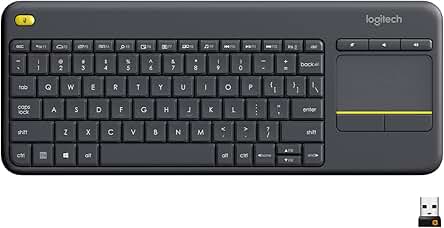
Logitech K400 Plus Wireless Touch TV Keyboard
Wireless connectivity provides up to 33 ft (10 m) range, though actual performance can vary with environment. For a typical living‑room layout, this range is sufficient to keep the keyboard responsive without line‑of‑sight, making it a good fit for couch users; however, those needing guaranteed low‑latency input for fast gaming should evaluate devices with wired or low‑latency wireless claims.
The built‑in touchpad and media‑control hotkeys let users navigate menus, adjust volume, and launch shortcuts without reaching for a separate remote. This convenience benefits viewers who prefer a single device for both typing and media control, while users who prioritize a larger dedicated touchpad or customizable macro keys may find the K400 Plus limited.
Who Should Buy and Who Should Skip
If you want a couch‑friendly input device that stays powered for months, the K400 Plus offers up to 18 months of battery life thanks to an on/off switch and power‑saving technology. This long‑term operation is ideal for living‑room setups where frequent battery changes would be inconvenient, and the spill‑resistant design (tested for up to 60 ml of liquid) adds protection against accidental coffee or soda splashes.
The keyboard works with Windows 7‑10+, Android 7+, and Chrome OS, and connects via a tiny plug‑and‑play USB Unifying receiver. Users who need a simple, wireless solution that requires no driver installation and can control media playback with built‑in hotkeys will find it a good match for PC‑connected TVs.
Tradeoffs and Comparison Context
The device is only spill‑resistant, not fully waterproof, and the documentation explicitly advises against immersion. Buyers who require a keyboard that can survive submersion or heavy liquid exposure should consider a fully waterproof alternative.
While the wireless range is listed as up to 33 ft (10 m), actual performance may vary with environmental factors, and the keyboard does not guarantee the low‑latency response needed for fast gaming. Users prioritising guaranteed low‑latency input or a larger touchpad for precise navigation may find the K400 Plus limiting.
Setup, Maintenance, and Ownership
Battery life is described as lasting up to 18 months, after which the batteries will need replacement; owners should plan for the cost of replacement batteries when the lifespan ends.
Setup is straightforward: insert the USB Unifying receiver into a free USB port and the keyboard works immediately. Optional customization is available through Logitech Options software, which can adjust media controls and shortcuts, but the core functionality does not depend on additional software.
Ongoing Ownership Costs and Warranty
The product listing does not provide a price or warranty duration, so prospective buyers should verify current pricing on the retailer site and consult Logitech’s official support pages for warranty terms. Ownership will include the cost of replacing batteries after the documented 18‑month lifespan, and any optional software features are free but may require a compatible operating system.
FAQ
How long does the battery last and what type of batteries are required?
The listing states the keyboard can operate for up to 18 months on a single set of batteries, aided by an on/off switch and power‑saving technology. It does not include a built‑in rechargeable cell, so users will need standard replaceable batteries after the documented lifespan ends. Battery life may vary with usage conditions.
What level of liquid protection does the keyboard provide?
Logitech specifies the K400 Plus is spill‑resistant up to 60 ml of liquid and explicitly advises against immersion, meaning accidental splashes such as a coffee spill are covered but submerging the keyboard in water will damage it. The protection rating is based on limited testing conditions and does not guarantee resistance to larger spills.
Which operating systems are supported and is any software required?
The product documentation lists compatibility with Windows 7, 8, 10 and later, Android 7 or later, and Chrome OS, all accessed through a plug‑and‑play USB Unifying receiver that requires no driver installation. Optional customization of media controls and shortcuts is available via Logitech Options software, but core functionality works without installing any additional programs.
Final Verification Checklist
- The exact model is Logitech K400 Plus Wireless Touch TV Keyboard.
- The keyboard is sold by Amazon.com via the provided affiliate link.
- Its compact layout and built‑in touchpad are intended for couch use within a typical living‑room wireless range of up to 10 m.
- Use‑case limits include spill resistance up to 60 ml (no immersion), battery life up to 18 months, and wireless range up to 33 ft (10 m) subject to environmental variation.
- All specifications are sourced from Logitech’s official product page and the Amazon marketplace listing.
Exact Product Links
- Logitech K400 Plus Wireless Touch TV Keyboard
- Check the exact Amazon listing
- Official model documentation
As an Amazon Associate, FitzPort Shop earns from qualifying purchases. This does not change the price you pay.
Featured in this Guide
As an Amazon Associate, FitzPort Shop earns from qualifying purchases. Product price and availability are confirmed on Amazon.
Related Resources
Frequently Asked Questions
Common questions about this guide
Buy the Logitech K400 Plus for relaxed wireless control of your PC-connected TV.
This guide takes approximately 5 minutes to read.
The "Featured in this Guide" section identifies the exact product listings used for the product-specific facts in this article. Open the linked product page to review its documented specifications, purchase checks, and retailer link.
Published product pages require an exact retailer identity, current listing data, a usable product image, official source information, documented specifications, and a decision-focused guide. Claims not supported by available sources are presented as buyer checks, not conclusions.
Amazon links are affiliate links. As an Amazon Associate, FitzPort Shop earns from qualifying purchases at no extra cost to you.
Product facts and retailer details are reviewed on a rotating schedule. Always confirm the exact listing, price, availability, seller, configuration, and return terms immediately before purchase.