Bottom Line
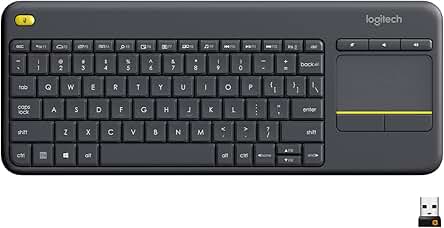
Shortlist the Logitech K400 Plus for controlling a PC connected to a television when you want keyboard input and a touchpad together. The important match is the control arrangement, not a promise that every television will accept it. Identify the actual host computer and connection requirements before buying. This is a source-based buying assessment, not hands-on testing. A suitable purchase begins with the device you need to control and where you intend to use it, rather than a generic claim that wireless input is automatically an upgrade.
Who It Suits
Buy It If
Consider it when your setup calls for text entry and pointer control from the same keyboard. Write down the tasks you expect to perform: entering a search, choosing an item or adjusting a supported media control. Then check that those tasks belong to the connected computer rather than a separate television interface. For a shared room, also establish who will use the controls and whether they prefer a touchpad. A combined arrangement can match your requirement without establishing that it is faster or more comfortable than another input method.
Skip It If
Choose another documented model if your requirement is a different host, a different connection method or a separate pointing device. Do not assume direct compatibility with a television merely because its screen displays a computer. If the intended purchase is primarily for a fixed typing desk, compare that requirement separately from occasional room control. This is not a claim that the K400 Plus cannot type documents; it is a reminder to choose the arrangement around the work you actually need to do.
Documented Specifications
| Officially documented detail |
Purchase check |
| Keyboard with built-in touchpad |
Decide whether combined pointer and typing controls suit your task |
| USB Unifying receiver |
Check the host connection before ordering |
| Wireless range up to 10 meters |
Treat the figure as conditional, not a room-wide guarantee |
| Battery life up to 18 months |
Preserve the use and computing-condition caveat |
| Spill test limited to 60 ml; do not immerse |
Do not translate a bounded test into waterproofing |
The official K400 Plus page lists Windows 7, Windows 8, Windows 10 and later, Android 7 and later, and Chrome OS. It describes media controls, an on/off switch and optional customization through Logitech Options. These are manufacturer statements, not independent measurements of responsiveness, key noise or battery runtime.
Decision Analysis
Start with the host rather than the screen. A television may be the display in a PC arrangement, but the computer remains the device accepting the keyboard input. Establish which device receives the USB receiver and which interface you want to operate. If you cannot identify that path, resolve it before comparing keyboard prices. This prevents buying around a photograph of a living-room setup instead of the connection requirements of your own equipment.
Next, separate the pointing preference from the typing preference. The integrated touchpad brings the controls together, but a buyer who prefers a separate mouse should count that preference as a real requirement. Consider where you would place and hold the keyboard during the tasks you named. Do not infer lap stability or universal comfort from the product category. Measurements or a suitable personal evaluation are more relevant than repeating a marketing adjective.
Finally, treat the wireless range as a planning reference. Check the intended distance and the actual room arrangement, while retaining the manufacturer's warning that user, environmental and computing conditions affect range. A published maximum is not proof of performance through your furniture or walls. The practical question is whether you can establish that the intended host and location are workable, not whether another listing prints a larger maximum number.
Comparison Context
Compare the K400 Plus with another exact keyboard model that addresses the same control task. Useful criteria include its documented host support, receiver arrangement, pointing method, layout and configuration requirements. A desktop keyboard-and-mouse bundle answers a different arrangement question; do not treat it as an automatic winner or loser simply because it has two devices. State which arrangement you want before weighing the remaining specifications.
Keep preference and evidence separate in the comparison. You may prefer an integrated touchpad without claiming that separate mice are inconvenient for everyone. You may want a different layout without asserting that one keyboard improves typing speed. If a requirement is essential, use it as a pass-or-fail criterion. For the remaining choices, compare exact offers rather than inventing price advantages, latency measurements or durability rankings not established by the supplied sources.
Ownership and Setup Checks
Before checkout, confirm the K400 Plus identity, selected layout, condition and seller. Check that the intended host meets the documented requirements and that its connection arrangement accommodates the receiver. For customization, review the current support information for the actual computer rather than assuming every operating system has identical software options. The product page's optional software reference does not justify inventing account requirements or an installation procedure.
Plan battery ownership without treating the maximum life claim as a fixed replacement schedule. Your usage and computing conditions may differ from the published basis. Check the exact package contents and battery instructions before setup instead of guessing supplied quantities. Keep the order record and consult the applicable warranty information if coverage is important to your choice. A manufacturer store promotion does not establish the terms for an unrelated marketplace seller.
Limitations and Checks
The spill statement has a specific tested quantity and an explicit non-immersion limit. Preserve both. It does not support claims of waterproof construction, protection from every drink spill or an indefinite service life. Likewise, a wireless range figure does not establish measured latency, competitive gaming performance or uninterrupted reception. Those would require different evidence from a specification-led purchase assessment.
The same distinction applies to key feel and touchpad preference. This page does not report personal typing sessions or measured noise levels. Decide which unanswered preferences would materially change your purchase, and seek the relevant information rather than allowing a broad reliability claim to answer them. An exact-model specification can narrow a shortlist without proving every aspect of an individual user's experience.
Verdict
Choose the K400 Plus when a compatible PC-controlled television setup and a combined keyboard/touchpad arrangement match your brief. Otherwise, compare the input arrangement you actually require. Inspect the exact Amazon listing for the selected offer and browse Computing and Gaming for related buying topics. The category is navigation, not evidence that unrelated devices are meaningful alternatives. FitzPort Shop earns from qualifying purchases as an Amazon Associate.
 Trending Editor's Pick