Bottom Line
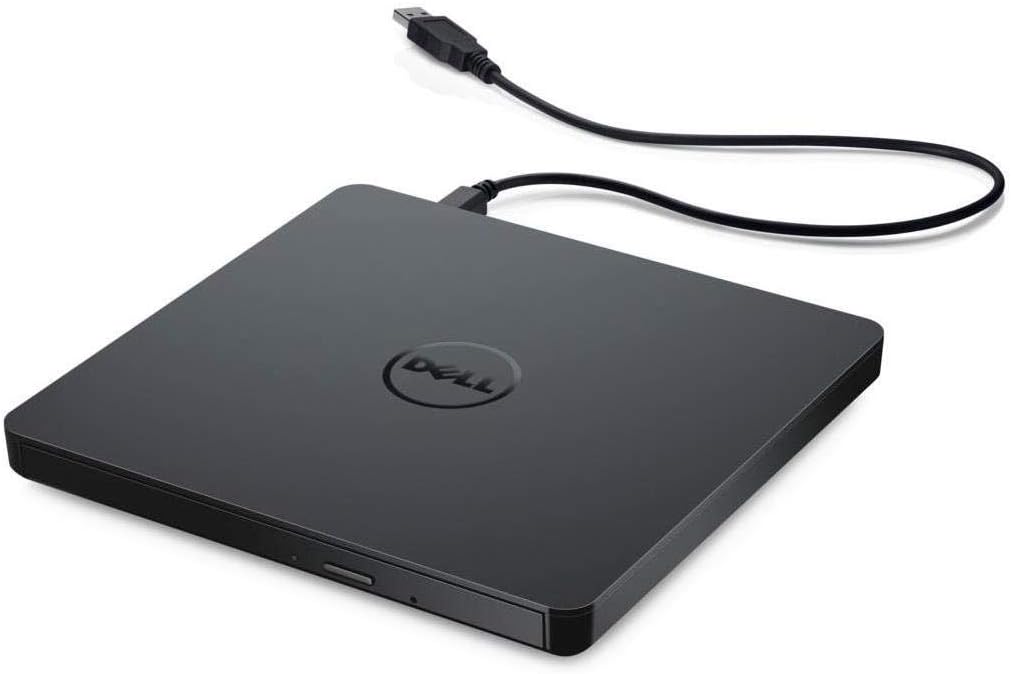
Choose the Dell External USB Slim DVD RW Drive DW316 when you need to read or write supported CDs and DVDs through an external USB connection. Dell documents a USB 2.0 host interface, tray loading, maximum CD read and write speeds of 24x, and maximum DVD read and write speeds of 8x. Those specifications establish a concrete optical-media role; they do not guarantee the completion time or readability of a particular disc. Start with the media you actually own and the operation you need to perform, rather than buying a drive simply because an old computer had one.
The useful tradeoff is access to physical media versus the work needed to maintain a compatible disc-and-software workflow. DW316 is relevant when the original files or software are on supported discs, or when you need to create compatible recorded media. It is not a substitute for deciding where your files will be stored afterward. The manufacturer's dimensions, included cable and software details make it possible to plan a specific setup instead of relying on the retained marketplace rating.
Who It Suits
Buy it if
Shortlist DW316 if your task involves supported CD or DVD media, your computer has a compatible connection arrangement, and you can identify the software needed for that task. Reading a disc, playing its media and authoring another disc are different jobs. Match the relevant disc type and application before ordering, especially when the result must work in a second device. A documented drive specification is useful evidence, but it does not establish the requirements of a separate player or program.
Skip it if
Choose another documented setup if your essential requirement is a media type or connection arrangement that this exact model's documentation does not establish. If all you need is ordinary file storage without optical discs, compare appropriate storage devices instead. Postpone the purchase when the disc format or intended application is still unknown: another drive with a similar name will not necessarily resolve that uncertainty. Do not treat a successful physical connection as proof that every software task is supported.
Documented Specifications
| Dell's DW316 specification |
Why it matters |
| External drive with USB 2.0 host interface |
Check the computer connection and any proposed adapter separately. |
| Maximum CD read, write and rewrite speeds: 24x |
Compare the relevant CD operation, not a universal completion time. |
| Maximum DVD read and write speeds: 8x |
Keep maximum figures separate from actual disc-task results. |
| Tray-loading mechanism |
Leave access to the tray in the intended working position. |
| 768 KB buffer |
Retain the stated buffer specification without claiming a measured reliability benefit. |
| Approximate weight: 200 g |
Include the drive and its required accessories in a carrying inventory. |
| Width 144 mm, depth 137.5 mm, height 14 mm |
Measure the available working and storage space. |
These figures come from Dell's exact DW316 product page. They should not be combined with another optical drive's speed ratings or a seller's unverified upgrade claims. In particular, a maximum CD figure should not be presented as the DVD speed, and a drive's interface specification should not become a promise about how quickly an entire collection can be copied.
Decision Analysis
Make the disc inventory first. Record whether each task is reading existing data, playing recorded content or writing new media. Then check that the relevant disc format is supported and that the intended application can perform that operation. This prevents a broad phrase such as DVD drive from concealing a more specific requirement. For a workflow involving another playback device, check its accepted media and recording arrangements independently before buying blank discs in quantity.
Next, plan the physical setup. The stated footprint gives you a basis for deciding where the drive will sit, while the tray mechanism means its opening needs to remain accessible. Dell lists an external two-foot USB cable in the package contents. Measure the route from your proposed connection point rather than assuming that a cable included with the drive will reach every desktop arrangement. If an adapter is required, confirm that connection path before adding it to the budget.
Comparison Context
Compare other optical drives by the same media tasks, host interface, supported formats, software needs and physical arrangement. A higher headline maximum is not automatically a better purchase if your actual task has another constraint. Equally, a familiar brand or high marketplace rating is not evidence that a particular application will work. Keep the comparison centered on requirements you can document rather than on imagined differences in sound, durability or disc-recovery ability.
The 200 g approximate weight is a component figure, not the weight of a complete travel kit. Include the cable, any required connection accessories and the media you intend to carry when comparing arrangements. The published dimensions support a measurement check, not a universal bag-fit or comfort claim. If disc use is occasional, compare the purchase with access to another suitable documented drive, while keeping any data-handling requirements specific to your own task.
Ownership and Setup Checks
Dell's selected page lists CyberLink Media Suite 12 and an external USB cable among the package contents. Confirm that the exact seller's offer contains the required items and that the software terms and system requirements suit your computer. Included software is not a guarantee of compatibility with every operating system or every media-playing task. Avoid substituting a different bundle's software or accessories when assessing this offer.
Read the exact DW316 instructions before setup, media handling or maintenance. This assessment does not supply an improvised cleaning method, firmware procedure or damaged-disc recovery promise. Keep the model details and purchase record available if you need support. When a task fails, distinguish the disc, application and host arrangement from the drive itself rather than assuming that replacing the hardware will resolve every problem.
Limitations and Checks
For total ownership cost, separate the drive price from any compatible blank media, software licensing or connection accessories your particular workflow needs. Check current seller terms instead of treating a captured price as a permanent offer. Obtain the warranty applicable to the actual seller and delivery region, and keep manufacturer coverage separate from the retailer's return window. No fixed warranty duration, repair price or service life is asserted here.
Before ordering, confirm DW316 on the offer and compare the included equipment with the documentation. Check the exact disc formats, intended software and physical connection route. These checks are conditions of a sensible purchase, not evidence that the drive is defective or incompatible. Missing task-specific information should remain unresolved until the relevant documentation is available; it should not become an invented negative about the product.
Verdict
DW316 is a concrete candidate for a defined supported-CD or supported-DVD workflow. Its documented interface, media-operation maxima, dimensions and package details provide a useful starting point for a purchase decision. Choose it when those facts match your actual task and verified computer arrangement. Choose a different documented solution when the task depends on a requirement you have not established for this model.
As an Amazon Associate, Fitzport Shop earns from qualifying purchases.
Check the exact DW316 Amazon offer, Dell's selected DW316 specifications and the site's research methodology. This is source-based buying analysis; no measured disc-performance results are presented.
 Trending