Bottom Line
Consider the Logitech MK270 when your purchase brief calls for a full-size keyboard and a separate mouse using a USB receiver. Choose the arrangement first, then verify the intended computer, layout and selected offer. This is a source-based buying assessment, not hands-on testing. It does not establish a typing-speed improvement, universal comfort or a latency advantage. The useful question is whether the documented controls and connection arrangement meet your daily tasks, not whether a general office label makes the combo appropriate for every desk.
Who It Suits
Buy It If
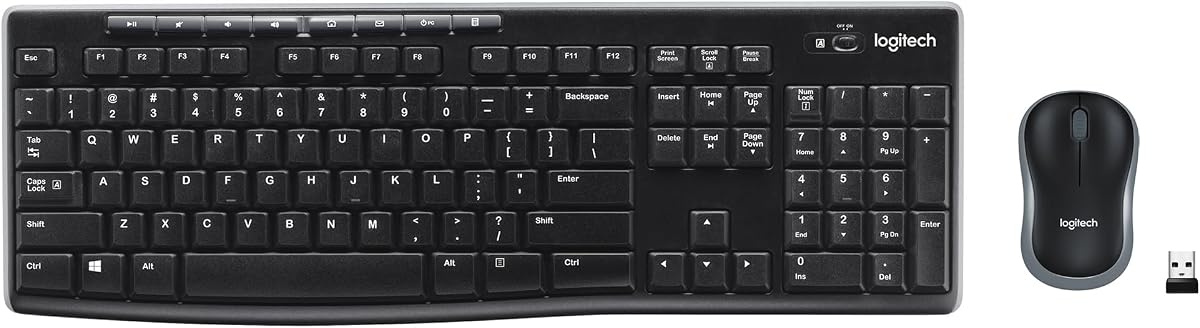
Shortlist this model when you want separate typing and pointing devices and expect to use the keyboard's number pad or media controls. Identify the actual tasks that make those controls relevant. For example, decide whether number entry is part of your routine instead of counting extra keys as an advantage in isolation. Review the selected keyboard layout with the intended user before ordering a shared or replacement workstation kit. Familiar-looking keys do not prove that every regional layout is the same.
Skip It If
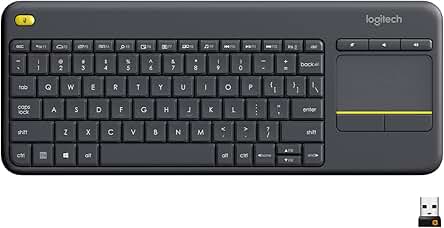
Compare another exact model when the essential requirement is a different connection arrangement, an integrated touchpad or a different keyboard format. Do not assume a receiver-based product matches a host merely because that host supports some wireless accessories. If a particular mouse shape or keyboard feel is decisive, treat it as an unresolved personal preference rather than relying on a claimed ergonomic benefit. A requirements mismatch is a reason to compare alternatives, not permission to invent limitations or advantages for either product.
Documented Specifications
| Manufacturer-stated detail |
Why it matters |
| Full-size keyboard with number pad |
Match the layout to your actual input tasks |
| Eight media controls |
Check whether the provided controls are relevant to your routine |
| 2.4 GHz wireless connection with USB receiver |
Verify the intended host arrangement |
| Wireless range up to 10 meters |
Preserve environmental and computing caveats |
| Keyboard battery life up to 36 months; mouse up to 12 months |
Plan the two devices separately, without guaranteeing runtime |
The official MK270 page also describes on/off switches and adjustable keyboard height. Its spill-resistance statement is bounded by a maximum 60 ml test and says not to immerse the keyboard. Those details describe the model; they are not independent evidence of comfort, reliability or productivity improvement.
Decision Analysis
Begin with the desk tasks. A number pad matters if you actually want that input arrangement, but its presence alone does not justify choosing a full-size format. Think about the working area you need for typing, pointing and any documents beside the computer. Confirm physical dimensions when space is tight rather than inferring that a compact mouse guarantees the whole kit fits. The separate devices let you choose their positions, but this assessment does not convert that arrangement into a medical or ergonomic outcome.
Next, identify the receiver's intended host and verify that connection before purchase. The wireless label describes how the input devices communicate; it is not a substitute for the host requirements. Distinguish a product intended for your computer from one that only looks similar in an online photo. If a required adapter or platform capability is uncertain, establish it from exact documentation rather than making the order depend on an unverified assumption.
Battery planning is a separate practical decision for each device. The manufacturer's keyboard and mouse figures differ, so one schedule should not be applied to both. The long maximums may be relevant to your ownership preferences, but use and computing conditions affect results. Plan to follow the actual battery instructions instead of extrapolating a guaranteed replacement date. There is no measured usage-based battery cost here, so a monthly ownership-cost figure would be speculation.
Comparison Context
Compare another full-size keyboard-and-mouse combo against the MK270 using the same requirements: connection, layout, controls, physical measurements and documented power arrangement. Do not turn a comparison into a list of unrelated devices from a broad category. A touchpad keyboard may be appropriate for a different setup, while a separate mouse may be your preference at a desk. State that preference explicitly instead of presenting a universal winner.
Likewise, do not infer relative typing speed, mouse accuracy or wireless latency from product descriptions. Those require comparable evidence for the exact models. If the essential requirements are satisfied by more than one candidate, compare the actual offers and the remaining documented differences. A temporary sale is not a permanent value ranking, and a familiar brand name does not establish that a different revision or regional variant has identical specifications.
Ownership and Setup Checks
Confirm that the selected listing is the MK270 combo with the intended layout, condition and seller. Keep the model name separate from the names of individual accessories or replacement parts. Inspect the package description rather than assuming every seller offers the same bundle. A factory package statement and a marketplace offer are different records; use the relevant one for the decision you are making.
Before setup, obtain the applicable instructions for the exact unit and host. This assessment does not supply a guessed pairing sequence, battery count or installation step. Follow the manufacturer's support material for those procedures. Retain the transaction record and check applicable warranty coverage if it affects your purchase. No specific warranty duration or seller eligibility is asserted from a product page that does not establish those conditions for your order.
Limitations and Checks
Keep the spill-test boundary intact. A limited keyboard test does not establish that the mouse has the same protection, that immersion is permitted or that any liquid accident is covered by a warranty. The meaningful purchase consequence is to avoid treating a spill-resistant label as blanket protection. Similarly, a nominal wireless range does not guarantee reception at every position in a particular room.
Comfort and key feel remain personal evaluation questions here. This publication has not measured those characteristics or established long-session results. Do not substitute a manufacturer's productivity language or marketplace stars for the evidence needed to settle a decisive preference. Decide which missing answer would actually change your purchase and resolve that answer, rather than allowing a long specification list to obscure the original requirement.
Verdict
Choose the MK270 when the full-size keyboard, separate mouse and verified receiver-based host arrangement match your needs. Compare a different documented configuration when they do not. Check the exact Amazon listing for the current selected offer. Browse Computing and Gaming for related topics, while keeping actual product comparisons within the same intended use. FitzPort Shop earns from qualifying purchases as an Amazon Associate.
 Trending